
Two-factor authentication (2FA) is a security system that reinforces the security of your seller account by adding an extra layer of protection. This helps secure your account in the event that your password is stolen.
How do I enable two-factor authentication?
1. Go to your Merchant Dashboard
2. On your profile in the top right corner, select “Manage account”.
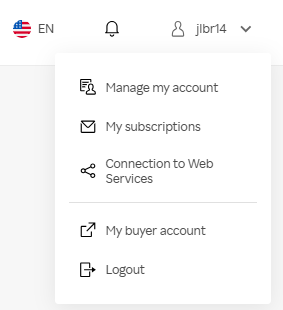
3. In the “Security” panel, click on “Settings”.

You will then be able to choose from our two available methods to enable two-factor authentication.
Use a password generator
OTP (One-Time Password) is a protection technique for your Rakuten account. It is applied upon login, thereby protecting all data accessible from your “My Account” space.
We recommend using apps such as Google Authenticator or Okta Verify.
Warning! To complete this process, you will need both a computer and a mobile phone.
Google authentificator
- Step 1: Download the application of your choice on your mobile phone.
- Step 2: Set up your application with your Google profile.
- Step 3: Log in to your Rakuten account and check the “Use a password generator” option.
- Step 4: Scan the QR code using your mobile phone.
- Step 5: Add the login code
For your very first time connecting to the app, you must click on the “Add a code” box.
For subsequent connections: Click on the “+” at the bottom right of your screen. - Step 6: Enter the code that was sent to your application on your computer.
- Step 1: Each employee must download the Google Authenticator app on their mobile phone.
- Step 2: The primary account holder goes to the “Settings” tab in their Google Authenticator app and selects the “Transfer accounts” tab.
- Step 3: The primary account holder selects the account they wish to share with other workstations.
- Step 4: Each employee scans the primary account’s QR code.
- Step 5: Each employee now has their own access to the primary account.
Google authentificator
- Step 1: Log in to your Rakuten account.
- Step 2: Open your Google Authenticator app on your phone.
- Step 3: Enter the code shown under “Rakuten” in your app into the designated field on the Rakuten website.
- Step 4: Access your Rakuten account with peace of mind!
Enable two-factor authentication via SMS
2FA or “Two-Factor Authentication” is an additional layer of protection for your Rakuten account, ensuring that you are the only user who can access your wallet and modify your bank details.
This method allows you to access all your information only after registering your phone number on your Rakuten account and entering a code that is only accessible via your SMS.
- Step 1: Go to your “My Account” area in the “Two-factor authentication” section.
- Step 2: Select the “Secure with a phone number” method.
- Step 3: Click on “Configure” and follow the steps indicated on the page.
