
You have various delivery methods at your disposal to offer the best parcel shipping solutions to your customers. You can choose your delivery method directly on your Rakuten account from the ‘My shipping methods‘ section in the ‘Seller settings‘ area.
Which delivery methods are available on Rakuten?
Several delivery methods are available, to be adapted according to the types of products you offer:
Standard method
No tracking, no signature. Ideal for low-value shipments of small size and/or weight.
Tracked method
Shipping with a tracking number (without signature). Allows you to track the progress of the shipment and share it with your buyer.
Recommended method
Shipping with tracking and signature required. Ideal for high-value shipments, for example. Please note, this method becomes mandatory for all orders with a value greater than or equal to €200.
As a seller, you do not have to pay any shipping costs upfront. It’s quick and easy: just print out the shipping label provided by Rakuten, attach it to the package, and drop it off at your local post office.
Rakuten covers your shipping costs through its partners via three shipping methods: So Colissimo, Chronopost, and Mondial Relay.
Information to consider:
With Chronopost, you commit to sending your parcel within 24 hours.
The So Colissimo and Chronopost shipping methods allow you to benefit from a parcel tracking number.
To select the shipping method, click on ‘Expedition and package pro‘. You will be able to indicate the shipping methods that your buyers can select when they place an order.
The So Colissimo, Chronopost, and Mondial Relay shipping methods are not available for bulky products (weighing more than 30kg) and international shipments.
One last piece of advice:
Always be sure to keep your proof of postage. In the event of a claim, this will prove that you did indeed send the parcel.
This delivery method allows a package to be transported from one location to another in record time. Express delivery is very useful for shipping packages containing valuable or important items. For this type of product, customers prefer faster delivery and are more likely to choose online retailers that offer this option.
By choosing this delivery method, you are opting for a premium service for shipping your parcels.
For an order placed before 2 p.m.
- On Monday, Tuesday, Wednesday, or Thursday, delivery is guaranteed by the next day at the latest.
- On Friday, delivery is guaranteed by Monday at the latest.
- On Saturday or Sunday, delivery is guaranteed by Tuesday at the latest.
For an order placed after 2 p.m.
- On Monday, Tuesday, or Wednesday, delivery is guaranteed by the day after tomorrow at the latest.
- On Thursday, delivery is guaranteed by Monday at the latest.
- On Friday, Saturday, or Sunday, delivery is guaranteed by Tuesday at the latest.
This delivery method provides you with 4 advantages:
- Significantly increase your sales by pushing the purchase date to the last possible moment, which can be very useful during key periods such as the Christmas season.
- Differentiate yourself from other merchants with an additional service.
- Diversify your delivery methods to reach a maximum number of customers.
- Optimize your conversion rate and make your buyers happy.
How to activate express delivery?
- Express delivery must first be activated by your E-Commerce Consultant. To contact them about this, click here.
- Once express delivery has been configured by your account manager, you must activate it by checking the Express box in the ‘My shipping methods‘ section of your account Settings.
This shipping method allows you to offer your buyers delivery to one of the thousands of pickup points in the Mondial Relay network.
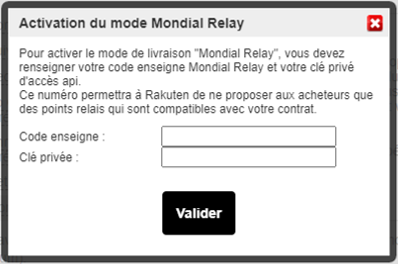
To offer this shipping method, you must have a Mondial Relay contract; your contract credentials will be requested when activating this shipping method.
To modify your shipping methods linked to Mondial Relay, go to your Rakuten account, in the Settings section.
Then click on Mondial Relay in the ‘My shipping methods’ section, then enter your brand code and your private key in the pop-up window that appears on the screen.
How to activate click and collect?
Rakuten is the leading omnichannel marketplace in France. The platform offers brands and local businesses a click & collect option: Rakuten Instore.
Today, several hundred brands and small retailers are taking advantage of this option. Offer your customers the ability to pick up orders placed within your Rakuten shop at your stores in two hours.
Why offer the Rakuten Instore option (click and collect)?
This service allows you to eliminate shipping fees. It is an ideal solution that enables your buyers to pick up their orders directly in-store or at a warehouse. Offering a physical location is reassuring and is a real time-saver for your customers.
Completely free, this delivery method also provides you with other advantages to help you stand out from the competition:
- Attract new customers: Offer your customers the option to pick up their order directly in-store just two hours after placing it on our platform. This allows last-minute shoppers to collect their orders and helps you introduce your store to a new community of buyers near you.
- Generate additional sales: 2/3 of customers who pick up a package in-store make an additional purchase. Thanks to the advice of your sales staff, boost your revenue with cross-selling and build customer loyalty. This also allows you to develop a trusting relationship with new customers who will return in the future.
- Increase your average basket: This option allows you to sell online all heavy and bulky products, which are complex to manage with standard delivery methods and entail high shipping costs. This is why the value of products picked up in-store is on average 47% higher than the average for products purchased online and delivered via standard methods.
- Remove your shipping fees: Offer competitive prices and generate a higher margin by eliminating shipping costs. Your buyers will be even more interested in discounted products.
How to activate Rakuten Instore for a single store?
1. Activate the option for your entire catalog
- To do this, log in to your Merchant Dashboard.
- Go to the Inventory section and click on Category Management.
- To select your entire catalog, click on All and then on Set shipping fees.
- Select the ‘In-store pickup’ delivery method, then enter your postal code and phone number.
All you have to do is click on Save. After a 2 to 3-minute update, all your listings will be available for purchase with in-store pickup.
Your E-Commerce Consultant can also activate the Rakuten Instore option on your account in just a few clicks. This delivery method will then be available on all products in your catalog in an instant.
To have your E-Commerce Consultant contact you and help you set up this service, please fill out this form.
2. Manually activate the option on a selection of products
If you prefer to choose the selection of products available for in-store pickup yourself, you can do it in just 3 clicks:
- Go to the My Account section by clicking here.
- Click on My listings in the Inventory section.
- Select the listing of your choice and click on Edit listing.
- Check the box ‘I authorize the buyer to come and pick it up on-site.’ Then, enter your postal code and phone number.
How to activate Rakuten Instore for multiple stores?
You can activate Rakuten Instore for multiple stores and link them to the same account if you wish. The stores will then be recommended to buyers via a geolocation system.
Our teams can support you in activating your click & collect and refining your strategy.
To be guided step-by-step through the activation of Rakuten Instore, do not hesitate to watch our tutorial.
Frequently Asked Questions About Shipping Methods
Free shipping has several advantages:
- More frequent shopping trips and larger average basket sizes;
- Reducing shopping cart abandonment;
- Greater customer loyalty.
However, offering free shipping comes with certain risks that should be taken into account:
- Lower profit margin on your sales;
- Encourages product returns, which can result in additional costs and logistical operations;
- The ratchet effect: Your customers get used to free shipping, so switching back to paid returns can frustrate them.
To strike the right balance, you can choose to offer free shipping only on certain occasions (sales, Black Friday, etc.), or only for orders above a certain amount. It’s up to you to find the right balance.
In the event of a delivery delay, the key points are:
- Identify the cause of the delay: whether the cause is external (weather conditions, vehicle breakdown) or internal (mislabelled parcel, error in your logistics tool), you can resolve the problem more or less quickly.
- Notify your customers as soon as possible;
- Be transparent but reassuring: answer your customers’ questions directly, while assuring them that they will indeed receive their parcel.
Offer compensation: a voucher, a complimentary item with their delivery, a partial refund…
- Analyze this delay to avoid it in the future.
Managing deliveries yourself can be costly and time-consuming. By outsourcing your logistics to a single provider, you limit intermediaries, reduce your costs, and save time.
En cas de retard de livraison, les points essentiels :
- Identifiez la cause du retard : si la cause est externe (conditions météo, véhicule en panne) ou interne (colis mal étiqueté, erreur dans votre outil logistique), vous pouvez résoudre le problème plus ou moins rapidement.
- Prévenez vos clients le plus rapidement possible ;
- Soyez transparent mais rassurant : répondez aux questions de vos clients sans détour, mais en leur assurant qu’ils recevront bien leur colis.
- Proposez des compensations : bon d’achat, article complémentaire offert avec leur livraison, remboursement partiel…
- Analysez ce retard pour l’éviter à l’avenir.
Gérer vous-même les livraisons peut être coûteux et chronophage. En externalisant votre logistique auprès d’un unique prestataire, vous limitez les intermédiaires, réduisez vos frais et gagnez du temps.
